

Discord Bridge
Root,
meet Discord.
Your Root channels on Discord, posted as the members who wrote them.
2 s
head start for your moderation tools before anything is sent
30 days
of edits and deletions that follow to Discord
14 days
of delivery history, with the reason for every failure
What Discord Bridge does
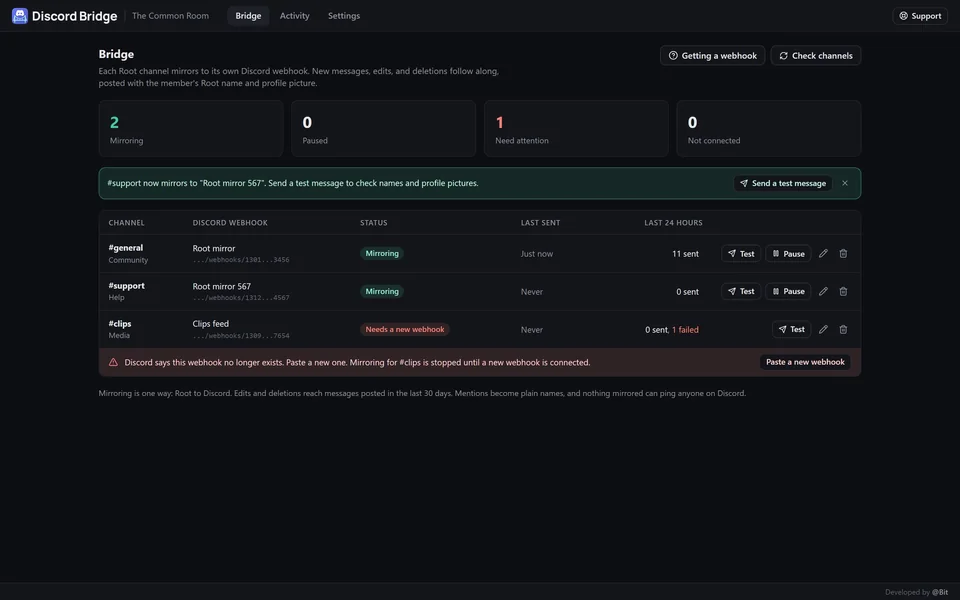
Mirror your Root channels to Discord, posted with each member's name and profile picture. Edits and deletions follow.
- Mirror the channels you choose
- Posted as the member
- Edits and deletions follow
- Set up in a minute
- See every delivery
- No pings, no leaks
Root, meet Discord. Discord Bridge mirrors the Root channels you choose to your Discord server, posted with each member's Root name and profile picture. Edits and deletions follow along.
Mirror the channels you choose
- Pick channels or whole groups under Channel assignment in the app's settings
- Connect each one to its own Discord webhook
- New messages show up on Discord as they're posted
- One way: nothing comes back from Discord
Posted as the member
- Each message carries the member's Root nickname and profile picture
- Attachments are posted as links
- Long messages are shortened to fit Discord's 2,000 character limit
Edits and deletions follow
- Edit a message in Root and the Discord copy updates
- Delete it and it's removed from Discord too
- Works for messages from the last 30 days, even while a channel is paused
Set up in a minute
- Paste a webhook URL from your Discord channel's settings
- Discord Bridge checks it with Discord before saving
- Send a test message to see names and pictures come through
- Pause, change, or remove a webhook anytime
See every delivery
- 14 days of what went to Discord, filtered by channel and status
- The reason for anything that didn't go through
- A channel whose webhook was deleted stops and tells you, while the others keep going
No pings, no leaks
- Mentions become plain names, and @everyone and @here never ping
- The webhook URL stays on the server; only a short ID is ever shown
- Only the community owner and the roles or members you pick can manage it
- Discord Bridge is an independent app, not affiliated with Discord
A closer look
01 / 06
What's new
-
v1.2.0
Light theme
- Discord Bridge now follows your Root theme. If you use Root's light theme, Discord Bridge shows in light colors too, and it switches as soon as you change your theme.
- Badges and labels have squarer corners, and channel labels stay compact on phones.
-
v1.1.0
Works alongside your moderation tools
- New messages and edits now wait 2 seconds before going to Discord. That gives automod, Warden, and other moderation tools time to remove a message first, and a message removed in that time never reaches Discord.
- If a message is edited during those 2 seconds, Discord gets the final text once instead of a post and then an edit.
- Messages removed before sending show on the Activity tab as skipped, without their text.
- Discord Bridge now keeps its data under 490 MB, inside Root's 500 MB limit.
- The community owner sees what's new once for each version.
Discord Bridge is an independent app, not affiliated with Discord.